Skip to content

Linux and Android

An assistant that gets things done.

Otto is an assistant that lives on your Linux desktop and your Android phone. Ask by voice or text and he answers questions, runs timers, reads your day, makes images and hands coding jobs to Codex, Claude Code and Hermes Agent. He is dry and sarcastic about it.

A port of Bluey by Riley (Mac and iPhone) to Linux and Android.

Otto, a soft lime-green plush, in an astronaut suit and glass helmet.

Video

Watch Otto

2:12 tour. Every line is a real conversation with Otto.

What he can do

Say it, and he gets on it

Otto is an assistant first. Each of these is in the app today. Cards with a boxed chat show a real exchange from Otto’s history; the others show an example of how you would ask.

Talk

Answers by voice or text

Hold a key, hold the mouse wheel, say the wake word, or type in the Ask box. The answer shows in a bubble and can be read aloud.

You In one short sentence, what is the tallest mountain on Earth?

Otto Mount Everest is Earth’s tallest mountain above sea level, at 8,849 metres.

What he did: answered straight away

Computer

Uses your computer for you

He looks at your screen, then clicks, types, presses shortcuts, scrolls and opens apps and links, and points at things with a green pointer.

You Create a T-shirt design based on the image I’m looking at.

Otto Printworks drafts, or hand-built in the design apps? Printworks suits this texture.

What he did: looked at the picture on your screen

Browser

Reads and clicks the web

“Hey Otto, find the install steps on that docs page.”

otto chrome gives him his own Chrome profile that he reads and clicks directly. You sign in to sites there once.

Music

Runs your music

Controls the YouTube Music app, shows a player card with a boom box, and pauses the music while you talk to him. A DJ mode introduces each song.

You Play music from my playlist, my liked playlist.

Otto Your liked playlist is shuffling. Gregory Alan Isakov, San Luis.

What he did: played your liked songs in YouTube Music

Timers

Timers and reminders

A countdown shows on screen; pause, resume or cancel by asking. Reminders are kept in a list you can read with otto reminders.

Reminders too: “Hey Otto, remind me at 3 to stretch.”

You Hey, Otto. Set a 50-minute timer.

Otto Fifty minutes. Timer’s running.

What he did: started a timer

Notifications

Tells you what matters

Smart mode reads out the notifications that matter and skips the rest. Choose all, smart or off.

Otto Claude finished the voxel city build, all tests pass, and nothing is committed.

Otto Hermes finished building and installing the scatter brush, and verified its algorithm.

What he did: read out the updates as they arrived

Memory

Remembers what you tell him

“Hey Otto, remember that I prefer short answers.”

Keeps a short list of lasting facts about you for every conversation. otto memory lets you read it, add to it or forget an item.

Think harder

Takes the hard questions to a bigger model

“Hey Otto, think harder about how to structure this project.”

He hands the question to Claude or ChatGPT through their official command-line tools, using your own subscription. Read-only: it can look things up, not change files.

Messages

Writes chat messages, sends on your yes

“Hey Otto, tell the team the build is ready.”

He types the message into your chat app like a person would and presses Return only after you say yes. No bot accounts or tokens.

Pictures

Makes images with your apps

Connect an image app once (otto connect), then just ask. Reference pictures of people can be named so they come out right.

You Create an image inspired by this webpage.

Otto A cheddar moonscape with a tiny lunar lander. Make it, change something, or cancel?

You Approved. Make it.

What he did: looked at your screen, drafted the picture for your approval, then made it

Agents

Hands coding jobs to AI agents

Passes the job to Codex, Claude Code or Hermes Agent, keeps track of it, and tells you how it went.

Otto Send it to Claude Code, change it, or cancel?

You Send it to Claude Code.

Otto Claude Code started your cat design. I’ll report back when it’s finished.

What he did: wrote a design brief and handed the job to Claude Code

Files

Takes files you give him

“Hey Otto, upload this picture.”

Drop a file on him or run otto give FILE. He can read it, post it in a chat, paste a picture or upload it, working from a copy, never the original.

Your day

Reads your calendar and mail

“Hey Otto, what is on my calendar today?”

After a one-time Google sign-in he reads your day and drafts replies. Nothing is sent until you say yes.

Skills

Learns your apps from short recipes

“Hey Otto, how do I do this in that app?”

Skills are small Markdown files that teach him an app or site. otto skills new NAME writes your own.

Discord

Optional news in your DMs

“Hey Otto, keep me posted while I am out.”

A separate bridge bot can push his news to your own Discord DMs, rate-limited so a burst can not flood them.

Songs

Writes songs in your songwriting studio

Hands the brief to Rhymewright, saves the song there, and asks before anything goes to a music generator.

Otto It Works on My Machine is saved in Rhymewright: indie rock about bugs multiplying and shipping anyway. Send it to Suno?

What he did: wrote the song in Rhymewright

Designs

Prices a job before it spends

Tee ideas are free; a draft costs credits, and he tells you the price and waits for your yes.

Otto A draft of Head of Loose Ends costs half a credit. Should I make it?

You Make it.

Otto Draft started, half a credit. It should take about a minute.

What he did: picked the idea, priced the draft, then started it after your yes

Status

Keeps you posted on long jobs

Ask any time how a background job is going, or tell him to stop.

You Status.

Otto Hermes is still working, six minutes in. No findings reported yet.

What he did: checked on the Hermes job

Integrations

Works with your apps

Otto plugs into the tools you already use. Each of these is in the current app.

Coding agents

Claude Code

Runs coding jobs for you and reports back. Also his route to Claude for "think harder".

Coding agents

Codex

Takes coding jobs by voice. Also his route to ChatGPT for "think harder", on your own plan.

Coding agents

Hermes Agent

otto hermes opens Hermes Desktop linked to him, so he can read its chat, send to it and answer its approvals.

Brain

Claude

Use your own Claude API key as the brain that powers his answers.

Brain

ChatGPT

Or sign in with your ChatGPT plan through the Codex CLI and run him on that.

Brain

Ollama Cloud

Or point him at Ollama Cloud with your own key, with a separate model for what he sees.

Voice

ElevenLabs

Optional: give him an ElevenLabs voice, save voices by name and switch between them.

Create

Higgsfield

Sign in once, then ask for pictures. He keeps named reference pictures of people for image jobs.

Create

ArtCraft apps

Connects to the ArtCraft apps (PhotoCraft, FilmCraft and others) through their built-in MCP servers.

Create

Rhymewright

Songwriting studio, reachable through a small MCP wrapper over its command line.

Music

YouTube Music (Pear Desktop)

Play, pause and skip, a player card, and he pauses it while you talk.

Web

Chrome

His own Chrome profile that he reads and clicks directly.

Chat

Discord

A bridge bot DMs you his news. In servers a guest Otto answers when @mentioned with dry comebacks (helpful in help channels), and critiques a member's post and its pictures on request.

Calls

Discord voice calls

His soundboard plays clips through a virtual "Otto Mic" so people in a call hear them, can play an entrance sound when you join a voice channel, and can send your music into the call.

Chat

Slack, Telegram, Element

Types the message in the app like a person would and sends only after you say yes.

Your day

Google Calendar and Gmail

Reads your day and drafts replies after a one-time sign-in. He sends only after your yes.

Projects

Production Desk

Reads your Production Desk board of channels, episodes and release dates live: status on request, a short rundown once a day, and a warning a few hours before a release.

Anything

Other MCP apps

Any MCP app can be connected once and then driven by asking.

On your desktop

See it work

Two everyday jobs, as they look on a real desktop: a question answered, and a timer running.

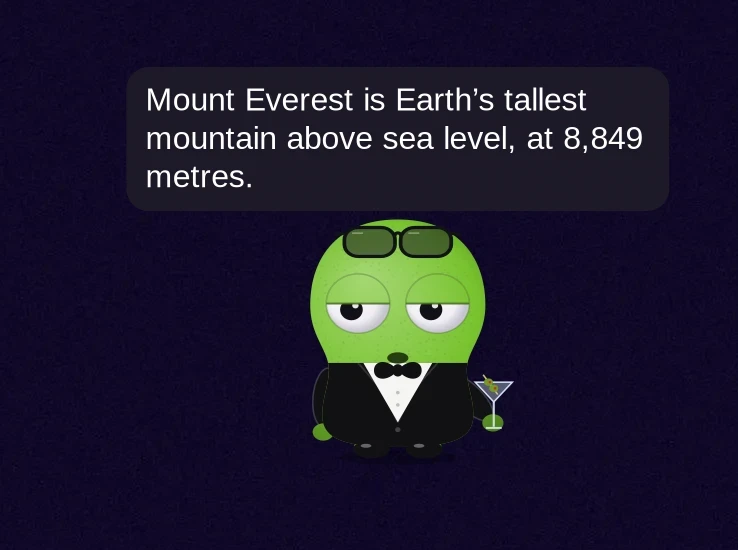
Otto in a tuxedo on the desktop with a speech bubble: Mount Everest is Earth's tallest mountain above sea level, at 8,849 metres.
Answers. Ask a question; the reply shows in a speech bubble next to him (and can be read aloud if you turn speech on).
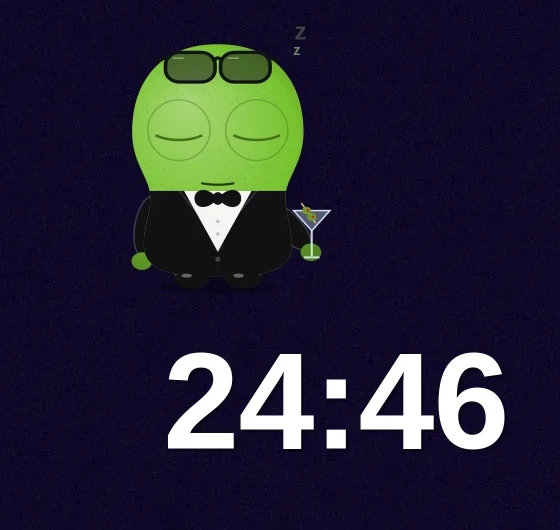
Otto dozing on the desktop with a large 24:46 countdown timer in the corner of the screen.
Timers. "Timer for tea, 25 minutes" starts a big countdown in the corner while Otto naps nearby.

Control panel

Every setting, one panel

Open Otto's panel from the bar and tune him without touching a config file.

What it shows

Nine groups, searchable

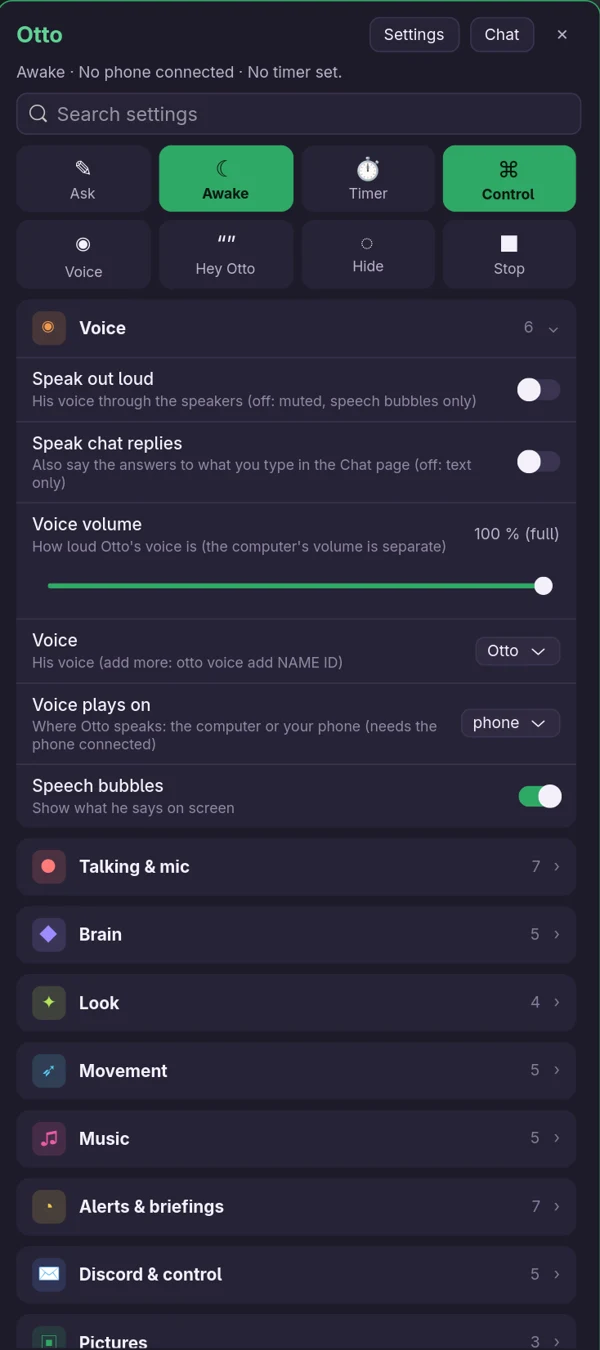
Voice, Talking & mic, Brain, Look, Movement, Music, Alerts & briefings, Discord & control and Pictures each fold open into plain switches and sliders.

  • Big buttons for Ask, Awake, Timer, Control, Voice, Hey Otto, Hide and Stop.
  • A search box that finds any setting by name.
  • Voice volume, which voice he uses and where it plays (computer or phone), and whether his words show as speech bubbles.
Otto's control panel on the desktop: quick buttons, a settings search box and the Voice group open, with Talking & mic, Brain, Look, Movement, Music, Alerts & briefings, Discord & control and Pictures below.
Otto's control panel, captured from the running desktop app.

Two apps, one buddy

Desktop and phone

The phone pairs with the computer over your network, so he follows you from one to the other.

Otto Desktop

Linux, built for Omarchy

Python and GTK4 on Wayland, tested on Hyprland. In daily use.

  • Screenshots with grim and on-screen text through Tesseract.
  • Top bar plugin, app launcher entry and start-at-login with otto install.
  • otto doctor checks AI, voice, Chrome, logins and the service, and says what to fix.
Otto Phone

Android 10 and up

Kotlin and Jetpack Compose. Working today.

  • Pairing with the desktop, voice, controls, a home-screen widget and notifications.
  • Speech to text from Android's own recognizer; replies can be read aloud.
  • Debug APK from CI, or build it locally.
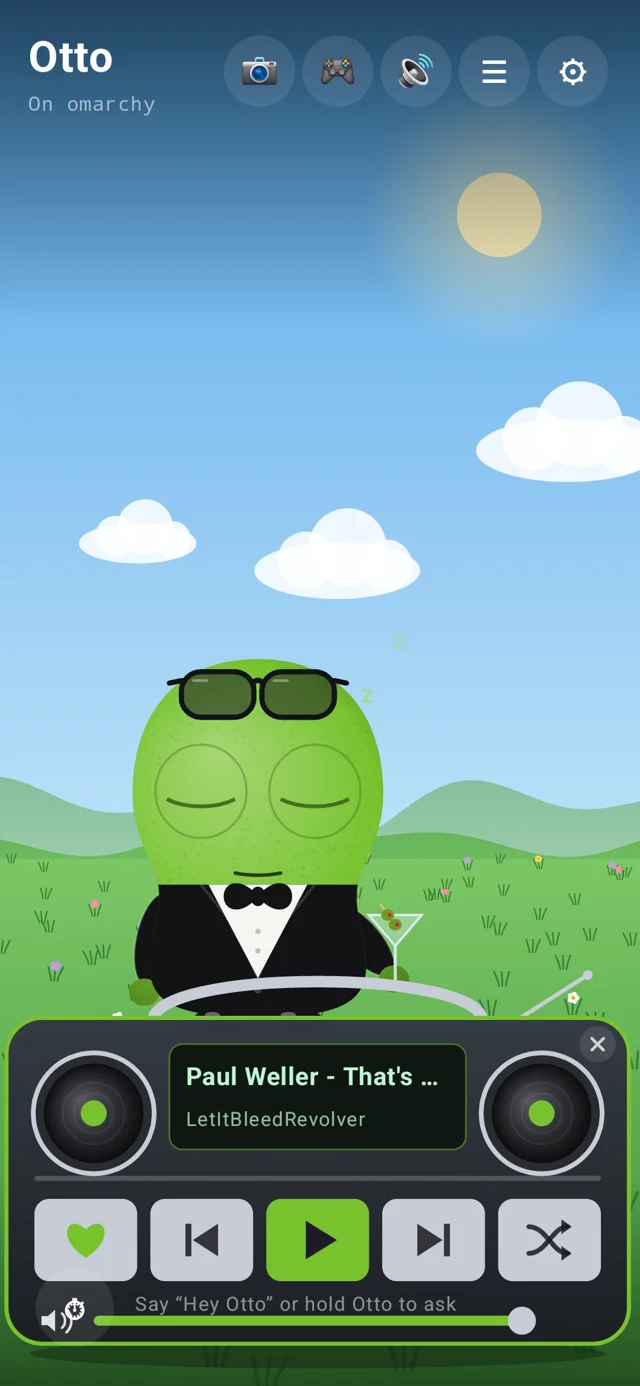
Otto's home screen on Android: a meadow scene with Otto in a tuxedo and sunglasses, and his boom box player card showing a song with previous, play, next and shuffle buttons.
Home. Otto in a meadow with his boom box player card: play, skip and shuffle from the phone.
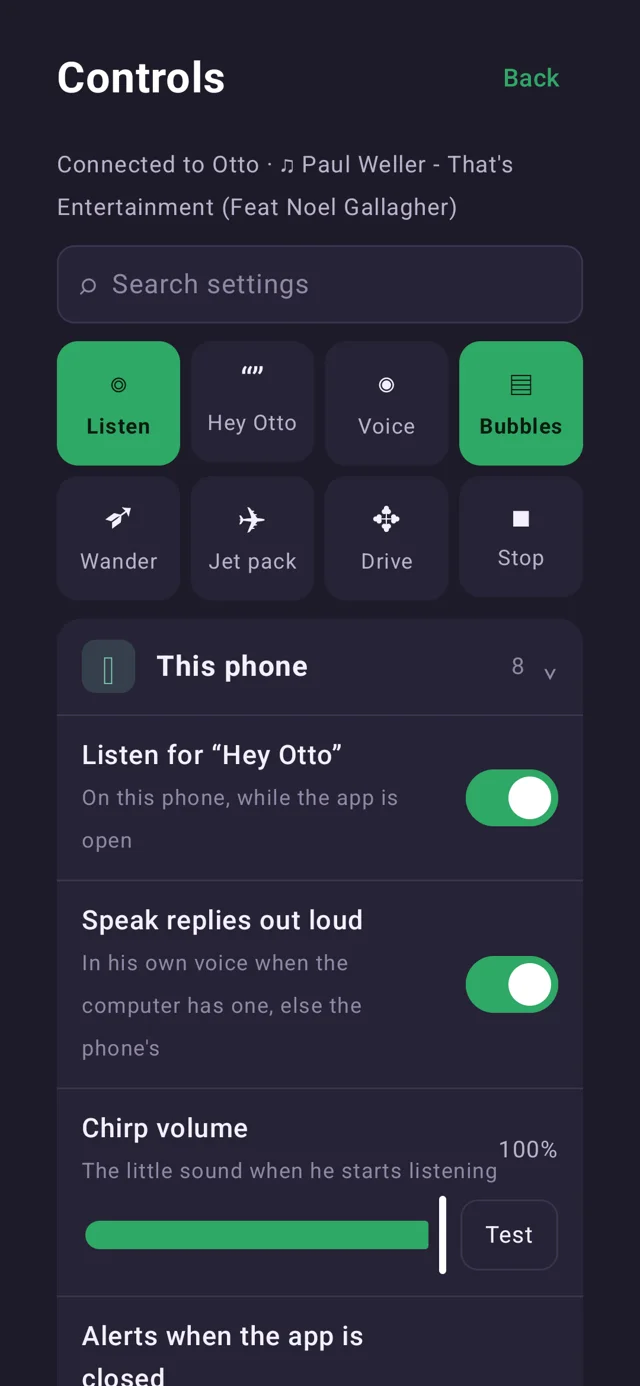
The Controls screen of the Otto Android app: a settings search, quick toggles for Listen, Hey Otto, Voice, Bubbles, Wander, Jet pack, Drive and Stop, and a This phone group.
Controls. Quick toggles for listening, "Hey Otto", bubbles, wander and the jet pack, plus searchable settings.
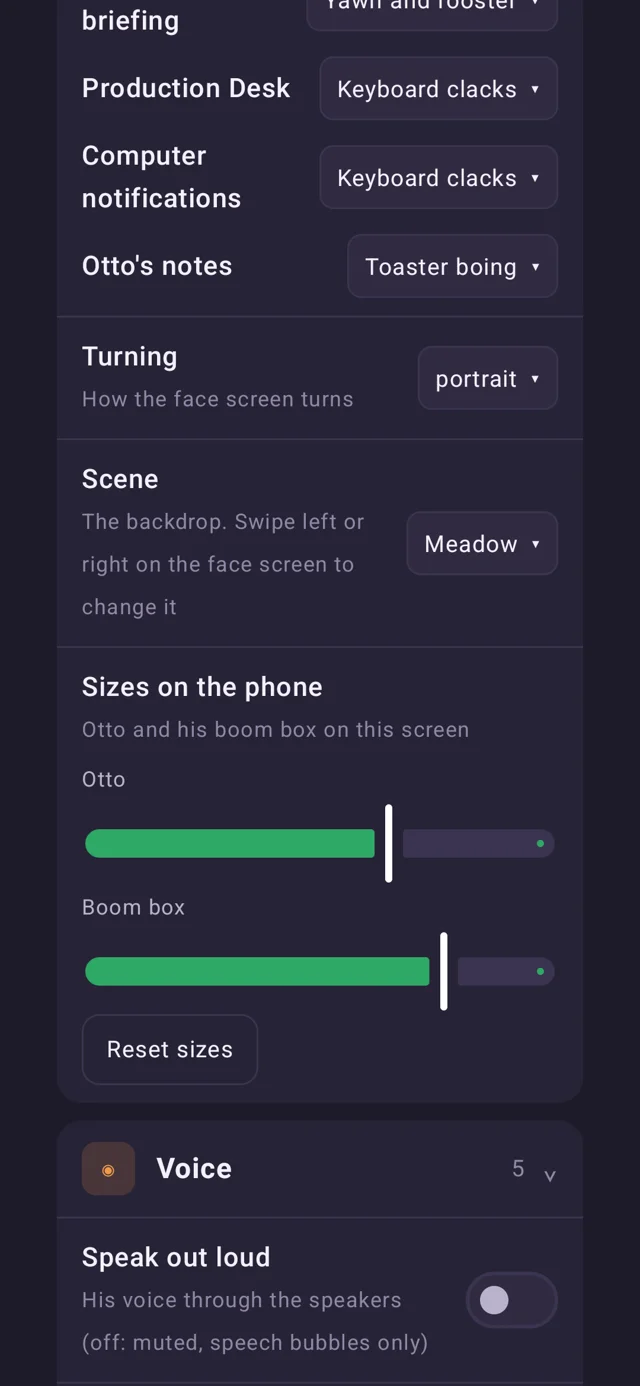
More Otto Android settings: alert sounds, the face screen's turning, the Scene backdrop set to Meadow and size sliders for Otto and his boom box.
Make it yours. Pick the backdrop, rotate the face screen, choose alert sounds and resize Otto and his boom box.

Voice and personality

Sarcastic, never mean

Otto is dry, deadpan and quick. The sarcasm is aimed at the situation. When he criticises, he has a reason.

Bold strategy, building an app by watching other people's videos.A nudge
Thirty minutes of actual work. I'll alert the press.After a focus session
Codex finished. It only asked me twice what you meant.When a job lands

Pick a voice with otto voice; ElevenLabs voices are optional. Rename him with otto name and he answers to "Hey" plus the new name.

Choose a brain

Bring your own AI

Otto works with your own key or plan. Switch any time.

# a few of the real commands
otto key            # Claude API key
otto key ollama     # or Ollama Cloud
otto chatgpt login  # or your ChatGPT plan
otto ai             # which AI he uses
otto talk start     # hold-to-talk
otto wake on        # "Hey Otto", offline wake word
otto desk           # Production Desk as Otto sees it
Private by default

Your keys stay on your machine

Keys are saved privately under ~/.config/otto. The wake word runs offline. Otto drafts mail and replies for you to approve and sends only after you say yes.

Run it

Get Otto going

Packaging is not done yet, so for now you run him from the source.

# Omarchy / Arch
# from the Otto source folder
cd desktop
python -m venv --system-site-packages .venv
. .venv/bin/activate
pip install -e ".[test]"
otto doctor
otto install
otto
Status

Honest state of things

  • Otto Desktop: in daily use.
  • Otto Phone: working, debug APK from CI.
  • AUR-style package and signed APK: not started.

Install the system packages listed in the README first.

Say hi to Otto

He won't say hi back with any enthusiasm. That is the charm.